Speaker layout
Tell the engine where your speakers actually are — a few lines of YAML, and VBAP figures out the rest. Stock rigs included, weird ones welcome.
A layout is just a list of where your speakers sit in space. Give the engine that, and VBAP works out how to steer any object onto them — no per-format wiring, no fixed channel map. Standard rigs ship ready to go; if yours is weird, it’s a few lines of YAML away.
What ships
The bundled layouts live in the layouts/ folder. The immersive ones (with height) are loaded as presets:
| Layout | Channels | Notes |
|---|---|---|
5.1.2 |
8 | 5.1 bed + 2 height |
7.1.2 |
10 | 7.1 bed + 2 height |
7.1.4 |
12 | 7.1 bed + 4 height — the default |
9.1.6 |
16 | 9.1 bed + 6 height |
If you never configure a layout, the engine falls back to 7.1.4. There’s also a layouts/legacy/ folder of flat (no-height) configs — 2.0, 2.1, 4.0, 4.1, 5.0, 5.1, 6.1, 7.1 — which you can import but which don’t show up as presets.
The YAML format
A layout is a name, an optional radius_m scale, and a list of speakers. Here’s the top of the default 7.1.4.yaml:
# Omniphony live 7.1.4 layout in normalized Cartesian coordinates.
# LFE remains non-spatialized.
name: "omniphony (live)"
radius_m: 1
speakers:
  - name: "FL"
    coord_mode: "cartesian"
    x: -1.0
    y: 1.0
    z: 0.0
    spatialize: true
    delay_ms: 0
  # ... FR, C, ...
  - name: "LFE"
    coord_mode: "cartesian"
    x: 1.0
    y: 1.0
    z: -1.0
    spatialize: false
    delay_ms: 0
Per-speaker fields:
name— the speaker label (FL,TFR,LFE, …).coord_mode—"cartesian"(all shipped layouts) or"polar".x/y/z— Cartesian position (orazimuth/elevation/distancein polar mode).spatialize—trueto pan it with VBAP,falseto route straight through (LFE).delay_ms— optional per-speaker output delay.gain_db,freq_low/freq_high— optional trim, and the speaker’s usable frequency range (see Crossover).
There is no channel-index field: output channel order is simply the order speakers appear in the file. (That’s a feature — e.g. 5.1.2 parks its two height speakers in the 7th/8th slots so it drops onto a plain 7.1 sound card.)
Where things are: the coordinate system
Cartesian coordinates are normalized to [-1, 1] and read like a room seen from above:
x— right is positive, left is negative.y— front is positive, rear is negative.z— up is positive, down is negative.
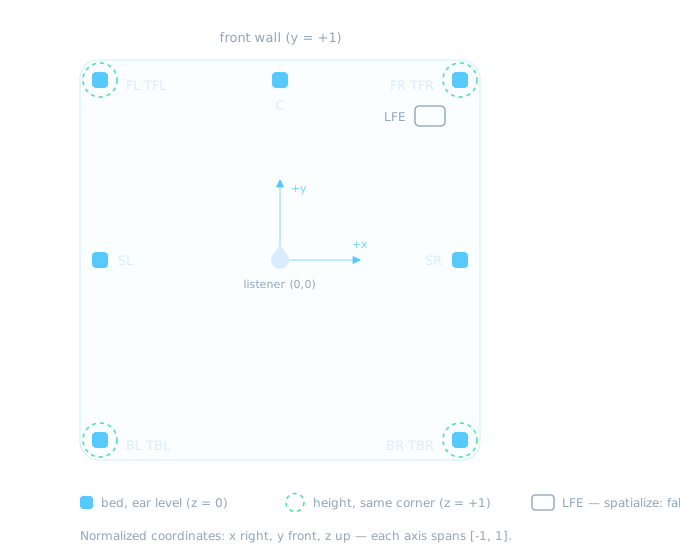
Prefer angles? Switch coord_mode to "polar" and use azimuth / elevation / distance instead: azimuth 0° is dead ahead, -90° is hard left, +90° hard right, ±180° behind you; elevation 0° is ear-level, +90° straight up. The engine keeps both representations for every speaker, so you can author in whichever feels natural.
distance(and the layout-wideradius_m) are for visualization and metres-per-unit UI scaling — they’re streamed to Studio to draw the scene, not used in the pan itself. Direction is what VBAP cares about.
Height speakers
Top speakers use a T prefix and positive z: TFL / TFR (top front), TBL / TBR (top back), and TSL / TSR (top side, in 9.1.6). The 9.1.6 layout also adds wide-front FWL / FWR on the bed.
How VBAP uses it
When you pick a layout, the engine collects every spatialize: true speaker, triangulates their directions on the unit sphere (Delaunay via convex hull), and renders each object through the three surrounding speakers. Notes:
- You need at least three spatialized speakers.
- If your rig is coplanar (everything at ear level), the engine injects virtual speakers at the poles so it can still form a valid 3-D hull, then folds their gain back into your real speakers.
- LFE and other
spatialize: falsespeakers sit out of the triangulation entirely — they’re fed directly.
Changing the layout triggers a topology rebuild on a background thread. Every freshly built topology is smoke-tested on reference positions before it goes live; if a layout can’t build (too few speakers, degenerate geometry, a misbehaving backend), the engine rejects it and surfaces the reason in Studio instead of stalling the scene or crashing the audio thread.
Crossover: rendering per band
Give speakers a usable frequency range — freq_low / freq_high, in Hz — and the engine splits every spatialized signal into bands and runs a separate pan per band, each on just the speakers that can actually reproduce it. Small speakers stop carrying the bass; a big speaker can carry everything. It’s entirely opt-in: leave the fields out (no bundled layout sets them) and there is a single full-range band with zero filtering cost.
How bands form
The engine collects every freq_low/freq_high value from spatialize: true speakers, sorts them, and slices the spectrum at those edges: two cutoffs at 120 and 500 make three bands — [0, 120), [120, 500), [500, ∞). A speaker belongs to a band when its own range contains the whole band; a speaker with no freq fields is full-range and belongs to every band. Up to 8 bands (7 distinct cutoffs) are supported.
One consequence worth knowing: if some frequency range is covered by no speaker, that band renders silence (with a warning in the log) — the engine won’t secretly fold it into speakers you declared unable to play it. Make sure the ranges you declare add up.
The filter
Each split is a 4th-order Linkwitz-Riley pair (two cascaded 2nd-order Butterworth sections per side), applied per object, per sample: −6 dB at the cutoff and a symmetric 24 dB/octave slope in both directions. A band-limited sub is genuinely protected from mids and highs, and band-limited mains are just as genuinely relieved of the deep bass — two octaves from the cutoff, out-of-band content is ~48 dB down.
Linkwitz-Riley is the standard speaker-crossover choice for a reason: the two sides stay in phase, so however many bands you create, they recombine flat in magnitude — a benign all-pass phase rotation is the only trace of the split, the same trade every AVR and active crossover makes. With three or more bands the engine also phase-aligns the lower bands at each upper cutoff, so the flat-sum property holds around every crossover point, not just the first.
Panning happens per band
Every band gets its own VBAP topology, triangulated over just that band’s speakers — and this composes with everything else: whichever render backend is active is instantiated per band on the reduced speaker set, so custom backends work under crossover without knowing it exists. An object’s low band might be shared between two woofers while its highs pan across the full ring.
Bands with fewer than three speakers degrade gracefully: two speakers become a pairwise directional pan, and a band with a single speaker sends everything to that speaker, wherever the object is — a property the subwoofer recipe below exploits. Per-speaker gain_db and delay_ms apply after all bands are summed, and headphone (binaural) mode bypasses the crossover entirely.
Routing object bass to a subwoofer
First, the default, because this trips people up: a spatialize: false LFE receives only the stream’s own LFE channel, routed to it directly by name. Objects never bleed into it, and nothing bass-manages the other channels — declaring an LFE does not mean “bass goes to the sub”. Out of the box there is no bass management at all.
If you want object bass collapsed onto the sub, flip it into the crossover and give it the low band alone:
speakers:
  - name: "LFE"
    spatialize: true      # joins the crossover as a real speaker
    freq_high: 120        # only handles the low band
    # x/y/z: wherever the sub physically sits
  - name: "FL"
    freq_low: 120         # opts *out* of the low band
    # ...same freq_low on every other spatialized speaker
Both halves of that recipe matter. freq_high: 120 on the sub puts it in [0, 120); freq_low: 120 on every other spatialized speaker takes them out of it. The sub is then the only speaker in the low band, and the single-speaker rule above does the rest: the sub receives the below-120 Hz content of every object, summed to mono, while the bands above 120 ignore it completely. It still receives the stream’s LFE channel as before — that direct feed is keyed on the speaker’s name and doesn’t care about spatialize.
Two precisions:
- Only spatialized content is bass-managed. Bed channels routed directly to their named speakers bypass the crossover, full-range. If your 2D sources are set to spatialized, they render as objects and their bass follows the recipe like everything else.
- If you skip the
freq_lowon the other speakers, they stay full-range and share the low band with the sub — object bass is then panned across sub + mains instead of collapsing onto the sub (a sub sitting at the listener position takes a fixed share rather than being panned). That’s a legitimate setup too; just know which of the two you’ve built.
Choosing a layout
In Studio — the Layout menu: pick a preset from the dropdown, or use the import buttons to load a .yaml from anywhere (this is how you pull in a legacy/ config or your own). The choice is saved to your config.
On the CLI — point --speaker-layout at a file and turn VBAP on:
orender render --enable-vbap --speaker-layout layouts/7.1.4.yaml input.binIn the config — two keys under [render]:
render.current_layout— a full layout embedded inline. This is what Studio writes and what the engine prefers.render.speaker_layout— a path to a YAML file.
Passing --speaker-layout (or picking a file in Studio) loads that file into current_layout, so the embedded copy is always the source of truth for a run.
Two layout-adjacent knobs
Both of these change how the layout is driven, and both live in Studio, the config, and OSC:
Surround placement (render.surround_placement, default Side) — for older 4.x/5.x sources that don’t carry dedicated back channels, this decides whether their surrounds sit at the Side corners (≈ ±90°) or the Back corners (≈ ±135°). Sources that already have back channels ignore it.
Output channel mapping (render.output_channel_mapping, default ByIndex) — how the finished speaker feeds are handed to the OS:
ByIndex— positionless: output port N carries layout speaker N, in file order. Right for a DAC / ASIO / CoreAudio device wired to your layout’s channel order.ByName— positional: each channel is tagged with its speaker position so a position-aware sink (PipeWire, a standard AVR) routes by name.
For how non-object bed content maps onto your layout, see Playback via mpv-omniphony.
Rolling your own
Copy the closest bundled layout, move the speakers to where yours physically are (normalized x/y/z, or polar angles), mark any subwoofer spatialize: false, and import it in Studio. If the geometry is valid you’ll see it render immediately; if it isn’t, Studio tells you why. That’s the whole loop — go put speakers in strange places.